Skins
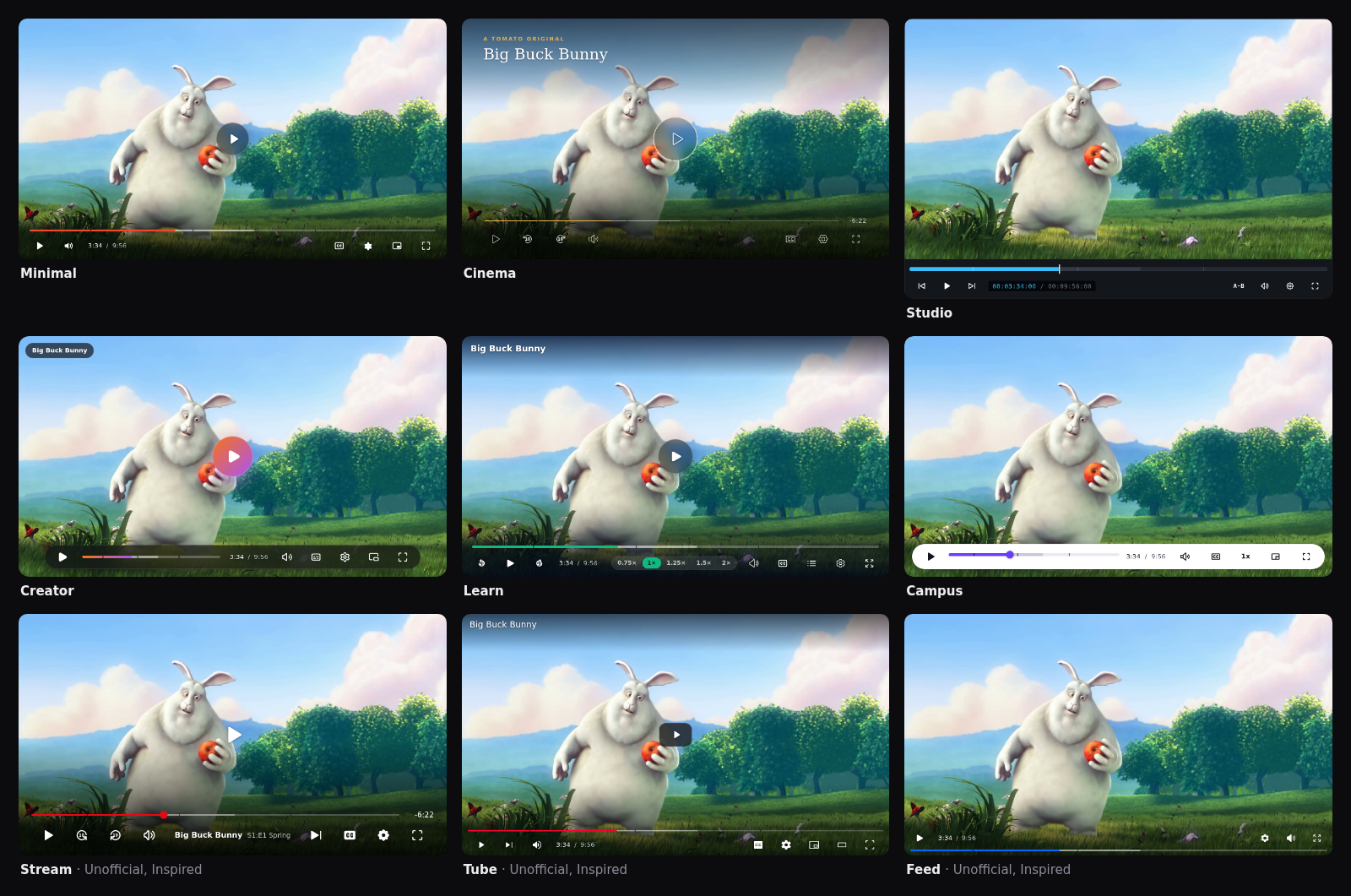
| Skin | Package | Character |
|---|---|---|
| Minimal | @tomato-player/skin-minimal | Clean, light, the default. ~0.6 KB gz. |
| Cinema | @tomato-player/skin-cinema | Premium. Serif title, eyebrow, gold gradient, remaining time. |
| Studio | @tomato-player/skin-studio | Professional. Toolbar below the video, SMPTE timecode, frame step, A-B loop, 0.1×–4×. |
| Creator | @tomato-player/skin-creator | Floating glass pill, two-stop gradient, cast button. |
| Learn | @tomato-player/skin-learn | Education. Speed chips, ±10 s, chapter panel, large readable captions. |
| Campus | @tomato-player/skin-campus | Ported from the CampusLoop landing page. Paper sticker strip, "Play the video" pill, sticker captions, tap to unmute, muted autoplay in view, 9:16 on portrait phones. |
| Stream (unofficial) | @tomato-player/skin-stream | Streaming-service patterns: big icons, ±10, centered title, next episode. |
| Tube (unofficial) | @tomato-player/skin-tube | Video-platform patterns: thin expanding progress, theater toggle. |
| Feed (unofficial) | @tomato-player/skin-feed | Social-feed patterns: muted autoplay in view, tap to unmute, compact bar. |
Stream, Tube and Feed are unofficial, platform-inspired designs. They contain no logos, fonts or assets of any company and imply no affiliation or endorsement.
Options
Every skin is a factory, and every factory accepts
tokens:ts
Design tokens
Tokens are CSS custom properties on the player root. Set them in CSS or through the
tokens option:| Token | Purpose |
|---|---|
--tp-accent | Progress, focus ring, active states. |
--tp-fg · --tp-muted-fg · --tp-bg · --tp-surface | Colors. |
--tp-track · --tp-buffer · --tp-thumb | Slider colors. |
--tp-radius · --tp-font | Shape and type. |
--tp-control-size · --tp-icon-size · --tp-gap · --tp-slider-height | Density. |
--tp-duration · --tp-ease | Motion. Zeroed automatically under prefers-reduced-motion. |
css
The
tokens option is written inline on the player root, so it beats any stylesheet rule. Use it for tokens a skin sets in its own tokens field, such as every official skin's accent except Minimal's. The custom skins guide has the full token table and precedence rules.State hooks for CSS
data-paused, data-playing, data-started, data-ended, data-waiting, data-seeking, data-fullscreen, data-pip, data-idle, data-live, data-muted, data-captions, data-error, data-menu-open, data-muted-autoplay, and data-size="sm|md|lg". The root is also a size container (container-type: inline-size), so @container queries work inside skins.Strict CSP
ts
Switching at runtime
ts
Build your own
To override a skin's layout or write a new skin, read Custom skins: the complete guide.